Demo version
A free Demo version of KbdEdit is available for download:
| Intel 64-bit (x64) : |
KbdEditDemoX64.exe |
Most modern Windows computers need this version. |
| Intel 32-bit (x86) : |
KbdEditDemo.exe |
For older computers, typically with less than 4GB of RAM. |
| ARM 64-bit (arm64) : |
KbdEditDemoARM64.exe |
For ARM64-based computers, such as Surface Pro X, or
"Apple silicon" M1 Macs running Windows. |
| all platforms : |
KbdEditDemo.zip |
|
Important: demo exe must be
started from an account with Administrator privileges; see
installation for
information on UAC restrictions
See Release notes
for information on the current version.
See Windows 10
SmartScreen warnings if you get a "Windows protected your PC" warning when
attempting to launch the demo.
The demo will give you a good impression of what the fully functional versions looks like, and
will even provide certain limited functionality.
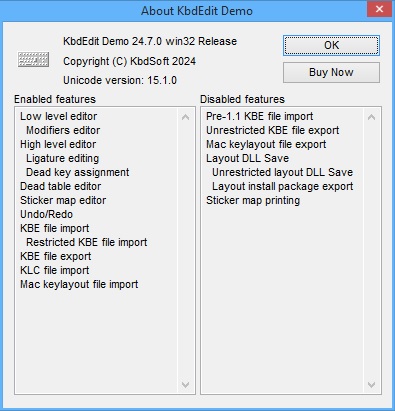
Which features are enabled in Demo version?
|
|
Features not accessible in Demo version
Changes to DLL layout files cannot be saved (command
Save is not
functional). New layouts cannot be created (Save
As dialog can be opened, but cannot be exited with OK). Consequently,
the KBE and KLC Import features are only partially functional: you can open
a KBE or KLC file in the editor, but you cannot create an actual layout DLL file. Sticker maps cannot be printed. DLL layout files cannot be registered with the system (Register
Layout DLL File dialog can be opened, but cannot be exited with OK). Custom layouts registered with the system cannot be deleted (Delete
keyboard layout dialog can be opened, but cannot be exited with OK). Important: Demo version-generated KBE
files containing low-level or
dead char table modifications cannot
be imported into the Lite edition. Important:
Player edition cannot deploy demo
version-generated KBE files - they must be run through the
Personal or
Lite version first.
|
 |
Essentially, the presence of restricted KBE Export / Import
features makes it possible to use the Demo version to design, test, save and
retrieve your custom layouts. The "DLL file save" functionality
being absent, a Personal or
Lite edition is still needed to deploy them.
|