 |
|
Frequently Asked Questions(Windows 11) KbdEdit installation fails with error code 2738 (Windows 11) explorer.exe crashes when activating a newly created custom layout (Windows 11) Custom layouts reverting to generic US English on a first login "Windows protected your PC" prompts under Windows 10 Characters mapped to CTRL positions are not produced, or only work in some applications Dead keys missing support for ligatures and non-BMP characters Modifier keys KANA, ROYA and LOYA not working in the Edge browser and other UWP applications Certain keyboard customisations not working properly in MS Office applications Can a physical key produce different virtual key codes for different modifier positions? "Corrupt or invalid signature" error when downloading a KbdEdit MSI installer Saving a custom layout fails with error message "cannot open file 'KbdEdit_Xyz.dll' for writing" My custom layouts have disappeared after a Windows 10 update How can I produce a high-quality soft copy of key cap stickers? My antivirus is flagging KbdEdit as malicious software. Should I be worried? Does KbdEdit support non-BMP (>FFFF) characters? My keyboard has extra keys that don't appear in KbdEdit's GUI. Can they be remapped? Can laptop Fn key be reprogrammed? Mozilla Thunderbird produces lower-case version of an upper-case letter mapped to AltGr Some (or all) AltGr combinations don't work in Office 2007 or another application Does KbdEdit work on Intel Mac under Parallels / Boot camp? Can 64-bit layout DLLs be generated from 32-bit KbdEdit? Can custom layouts be used on a computer with no KbdEdit installed? The character palette contains only basic Latin letters. How do I enable other Unicode characters? (Windows 11) KbdEdit installation fails with error code 2738This error is caused by the missing VBSCRIPT runtime support, which is considered deprecated, and is being made optional in recent versions of Windows 11. KbdEdit's dependency on VBSCRIPT will be removed in one of the upcoming releases. A short-term workaround is to enable the VBSCRIPT optional feature, as described in this MS techcommunity article (section Phase 2). (Windows 11) explorer.exe crashes when activating a newly created custom layoutexplorer.exe may crash when trying to activate a newly created custom keyboard layout via the language bar. This issue is specific to Windows 11. The workaround is to log out, and log back in to the same user account. Restarting the computer works as well. After the repeat log in, the new layout is properly recognised by the OS, and can be activated without issues. (Windows 11) Custom layouts reverting to generic US English on a first loginIf a layout is loaded into the language bar list, it may revert to the generic US English layout when logging in for the first time after a fresh OS restart. This issue is specific to Windows 11, and affects layouts created by KbdEdit Personal, Lite or Player. Layouts created with KbdEdit Premium are not affected. A proper fix is being worked on. In the meantime, a workaround is to log out and then immediately log back in to the same user account. This should be done without restarting the computer. On a repeated log in, all custom layouts should activate correctly. "Windows protected your PC" prompts under Windows 10In recent Windows 10 versions, a "Windows protected your PC" prompt may be shown by Microsoft Defender SmartScreen when you attempt to launch a KbdEdit executable or MSI installer. This prompt is most likely harmless, and is merely caused by KbdEdit being signed by a "OV" instead of "EV" digital certificate. For more details, see Windows 10 SmartScreen warnings . Characters mapped to CTRL positions are not produced, or only work in some applicationsThe use of CTRL as a general-purpose modifier is not recommended. For details, see CTRL as a general-purpose modifier? Dead keys missing support for ligatures and non-BMP charactersA common user complaint is that KbdEdit does not allow the use of ligatures and non-BMP characters with dead keys. As explained in dead key limitations, this restriction is built into the Windows keyboard layout model. It is unfortunately not possible to overcome it at the KbdEdit level. Modifier keys KANA, ROYA and LOYA not working in the Edge browser and other UWP applicationsThe issue existed in Windows versions prior to Windows 10 20H2. The underlying cause was a limitation (or rather a bug) of the OS itself, ie the UWP platform, which even affected the built-in layouts shipped with Windows. It is documented on the modifiers page. Thanks to Danila Sentyabov for confirming that this is no longer an issue. Certain keyboard customisations not working properly in MS Office applicationsCertain high-level keyboard customisations are known to not work properly inside MS Office applications, especially MS Word. The issues generally center around dead key transformations, with details dependent on a specific Word version. Apparently, Office applications have their own methods and heuristics for recognising and entering complex Unicode characters. These methods can end up duplicating, and in worse cases interfering with Unicode mappings defined in custom KbdEdit layouts. For a specific example, check this bug report, submitted by KbdEdit user Kevin Brown on Micorosft's own support forum. The most pertinent section is (C) DIRECT UNICODE INPUT FROM CUSTOM SOFTWARE KEYBOARD. It should be stressed that these are not KbdEdit issues, and hence cannot be fixed at the KbdEdit end. The same layouts that produce erratic behaviour in MS Office work without fault in other applications with less aggressive Unicode handling, such as Windows built-in Notepad and WordPad. Can a physical key produce different VK codes for different modifier positions?One of the most requested features has been for a key to change its function (ie virtual key aka VK code) depending on the active modifier combination. Eg, a customer would like the "Caps Lock" key (virtual code VK_CAPITAL) to act as "Arrow Left" (VK_LEFT) when Shift is down. Since version 19.5.0, this feature is supported in the form of Alternative VK code special NLS functions. The feature is showcased by these examples:
"Corrupt or invalid signature" error when downloading a KbdEdit MSI installerWhen downloading a KbdEdit MSI installer package, Microsoft's "Edge" web browser may report the following error: "The signature of KbdEditSetup_<version_details>.msi is corrupt or invalid." The error is reported because the installer file is not digitally signed. It is harmless, and can be safely ignored - the download links received via purchase confirmation emails are guaranteed to lead to clean, valid KbdEdit installers. If you are bothered by the error, you can easily avoid it by using a non-Microsoft web browser, such as Google Chrome or Mozilla Firefox. Saving a custom layout fails with error message "cannot open file 'KbdEdit_Xyz.dll' for writing"The problem has started occurring in Windows 10 since roughly the end of 2016. It prevents saving changes to the currently active layout, due to the layout DLL file being kept locked by a system process ctfmon.exe. In KbdEdit 19.8.0, a workaround has been implemented whereby another layout is temporarily activated for the duration of the save operation. This tricks the ctfmon.exe process into locking the newly activated layout, and releasing the lock on the previously active layout. If you are using an older KbdEdit version, you can perform this same workaround manually, by temporarily activating another layout in the language bar list. An even easier way is to switch to the Preview mode before attempting the save operation - activating the preview layout has the same effect of releasing the lock on the file being saved. If these simple workarounds do not help, you may have to deal with the problem more directly, by locating and terminating the offending process instance:
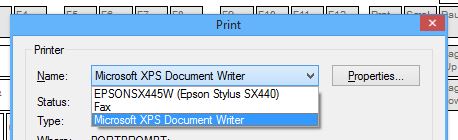
After this, you should be able to save the changes to your layout. Thanks to Mike Grant for help with troubleshooting this issue My custom layouts have disappeared after a Windows 10 updateSince version 19.8.0, KbdEdit supports automated recovery of custom layouts lost during a Windows 10 upgrade - see Restoring custom layouts lost during a Windows 10 upgrade. If you are running an older KbdEdit version, you can still re-register your custom layout DLL files manually using the Register Layout DLL file command, as described here. This is possible because Windows 10 upgrade only loses the custom layouts' HKLM registry entries. The layout DLL files themselves are preserved under the system32 directory, so fortunately you do not have to recreate your custom layouts from scratch. How can I produce a high-quality soft copy of key cap stickers?The Sticker Map view enables easy creation of key cap sticker printouts. Occasionally, one may also want to obtain a soft copy as a high-resolution bitmap or, even better, a vector drawing. KbdEdit does not have a built-in command for exporting sticker maps to a file, but this functionality can be easily achieved using the Microsoft XPS Document Writer virtual printer, which is included with every Windows version since Vista. Instead of paper, this "printer" sends printouts to files in the XPS vector format. To produce a XPS sticker file, simply click the "Print Sticker Map" button, as you would do when printing stickers on paper. In the "Print" dialog that follows, choose "Microsoft XPS Document Writer" from the dropdown of available printers. This printer will be available even if you don't have any physical printers attached to the computer.
After clicking "OK", the "Save Print Output As" dialog will show up, allowing you to choose the XPS file name. If you prefer the PDF format, since Windows 10 you can use the built-in "Microsoft Print to PDF" virtual printer. For older Windows versions, you can choose from any of the numerous third party virtual PDF printer drivers - we recommend PrimoPDF. My antivirus is flagging KbdEdit as malicious software. Should I be worried?The unfortunate fact about Windows keyboard layout file format is that, internally, it is an executable file (DLL) that has to be saved to the Windows System directory (see Administration and Deployment). This tends to trigger an “allergic reaction” in most antivirus programs, which are trained to treat any attempt to create executable files in sensitive system locations as a malware attack. This broad brush tends to taint even benign software like KbdEdit, which has a legitimate need for writing DLL files in the System directory. It is very difficult to create whitelist entries for kbd layout files - each file is different by virtue of hosting a different layout payload, so it is hard if not impossible to create a specific whitelisting “fingerprint”. As a workaround, if your antivirus software has an option to whitelist specific files, or groups of files, you can create a rule to exclude files matching pattern c:\Windows\system32\KbdEdit*.dll. If your computer runs a 64-bit operating system, you should also add c:\Windows\SysWOW64\KbdEdit*.dll . You may also need to whitelist KbdEdit's own executable files KbdEdit.exe and KbdEditServer.exe. These files reside in KbdEdit's installation directory, which is by default C:\Program Files (x86)\KbdSoft\KbdEdit <version> <Edition>\ (64-bit OS), or C:\Program Files\KbdSoft\KbdEdit <version> <Edition>\ (32-bit OS). As an example, for KbdEdit 1.3.4 Premium edition, and default installation directory on a 64-bit system, you should whitelist these two files:
Does KbdEdit support non-BMP (>FFFF) characters?The range of 16-bit characters 0000-FFFF is known as the "Basic Multilingual Plane" or BMP. These characters can be directly represented by the UTF-16 encoding KbdEdit uses. Unicode standard also defines 16 other planes with numerical character values ranging from 10000 to 10FFFF. Characters from this range are known as "non-BMP" code points. Starting with version 1.2.2, non-BMP characters are fully supported by KbdEdit. More precisely, they are supported to the extent the Windows keyboard model supports them - in practice there are some limitations with Caps-Lock mappings and dead characters. These limitations are caused by the way non-BMP characters are represented internally: since their numeric value is higher than FFFF, they must be stored as two-character ligatures of surrogate pairs. This renders them unusable in the few places where ligatures are not allowed. For example, non-BMP codepoint 𠀀 20000 ("CJK Unified Ideograph Extension") is internally represented as a ligature of surrogate characters D840 and DC00. For an exact algorithm for calculating surrogate pairs, refer to the UTF-16 Wikipedia page. You can also try this very handy Surrogate Pair Online Calculator. To properly render non-BMP characters, you will also need a font with good coverage of non-BMP Unicode ranges. We recommend Everson Mono. My keyboard has extra keys that don't appear in KbdEdit's GUI. Can they be remapped?Certain keyboard models have less common or non-standard keys that don't appear in KbdEdit's GUI. These keys cannot be made "current" by clicking on their visual GUI representation, but it still might be possible to remap them. First, switch to the Low-level editor. Then press the non-standard key on your physical keyboard. If this causes the "Scan code" field to change - congratulations, the key can be remapped, and you have just discovered its scan code. The key might already have a virtual code assigned, in which case it will be displayed in the "Assigned virtual code" combo; otherwise, the combo will show "VK__none_". If you want the key to behave as a non-mappable key (see List of Virtual Key Codes), simply choose the desired non-mappable VK code from the "Assigned virtual code" combo (e.g. you can make the key behave as Caps Lock by assigning it VK_CAPITAL). If you want the key to produce characters, you should first give it an unused mappable virtual key code (VK), again by choosing it from "Assigned virtual code". Choosing the right VK might involve certain amount of hit-and-miss - unlike the standard keys, you cannot use the right-click popup which neatly classifies VKs into mappable / nonmappable, used / free. After you have assigned an unused mappable VK (e.g. VK_ATTN), switch to the High-level editor. To make the key current, and thus editable, use the "Current key" combo to activate the VK you have just assigned to your non-standard key. It might also be possible to activate it by pressing it on the physical keyboard. Once the key is made current, you can modify its mappings through the Mappings for the current key zone. E.g. you can edit the mappings using drag-drop, or through the Key mapping editor popup dialog. Can laptop Fn key be reprogrammed?Unfortunately, no. The Fn key is hard-wired on the hardware level to change the function of other keys it impacts. The behavior of this key is not standardized - each laptop model handles it differently. Unlike other "normal" keys, it doesn't produce a scan code visible to Windows, and hence cannot be given a virtual key code (see Low-level editor for an explanation of scan and virtual key codes). Mozilla Thunderbird produces lower-case version of an upper-case letter mapped to AltGrThe popular Mozilla Thunderbird email client has a weird quirk that, even though probably created with the best intentions, ends up being quite annoying: If an upper-case letter (e.g. Ç) is mapped to an AltGr combination, Thunderbird's editor will produce its lower-case version (ç in this case). All other Windows applications produce the correct letter (i.e. Ç). Thunderbird's "logic" seems to be that since the modifier combination doesn't include Shift, the user probably doesn't want it to produce upper-case letters. The workaround is to move all upper-case letters from AltGr to AltGr+Shift . You might first have to enable this combination if it is not available in the High-level editor: switch to the Low-level, and move SHIFT + ALTGR from the "Unused modifier combinations" list to "Active modifier combinations". Thanks to Peter Fairchild for pointing this problem out. Some (or all) AltGr combinations don't work in Office 2007 or another applicationThis is usually caused by a conflict between Ctrl+Alt keyboard shortcuts and AltGr mappings, AltGr being simply a shorthand for Ctrl+Alt. The solution is to replace AltGr with another modifier key which is not so overused, like Kana. See this example for a detailed step-by-step guide. Does KbdEdit work on Intel Mac under Parallels / Boot camp?Yes, KbdEdit and its custom layouts work without problems on Intel Macs running Windows under either Parallels or Boot Camp. This example shows how to fix the positions of Win, Alt and Ctrl keys when running Windows on a Mac. KbdEdit also supports Windows as a guest OS under all major virtualization products (VMWare, VirtualBox etc). Can 64-bit layout DLLs be generated from 32-bit KbdEdit?No. 32-bit version of KbdEdit is capable of generating only 32-bit keyboard DLLs. Conversely, 64-bit version generates only 64-bit DLLs. The recommended method for 32/64 bit interoperability is to use KBE files, which are platform-independent. Can custom layouts be used on a computer with no KbdEdit installed?Custom layouts exported as Standalone Layout Installer packages can be deployed without any restrictions, i.e. they don't require a version of KbdEdit to be installed on the target computer. Note however that only Premium edition can generate these packages. On the other hand, KBE files generated by the Personal or Lite edition require a version of KbdEdit to be installed on the target computer. KbdEdit Player provides a cost-effective solution for "create once, deploy many times" scenarios. The character palette contains only basic Latin letters. How do I enable other Unicode characters?You have to use the Manage Palette dialog to activate desired Unicode subset(s). Alternatively, selecting any characters through Unicode Search automatically activates their subset. |
|
Copyright © KbdSoft 2007-2026 |