 |
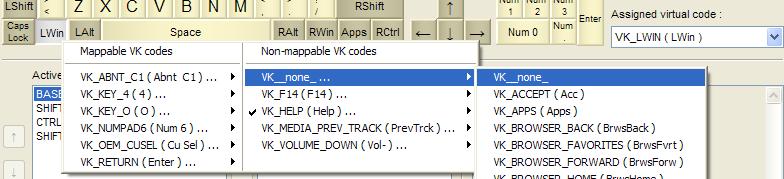
Example - For gamers: disabling the WINDOWS keyInstaller package: KbdEditInstallerUSEnglishDisabledWin.exeLayout file: US English (disabled Win).zipYou can use the installer package to deploy this keyboard layout without any restrictions. Free Demo version can be used to make changes and test them. To deploy a modified version, a Premium, Personal or Lite edition is needed. If you have ever played a full screen game under Windows, this has probably happened to you: in the midst of the game, you accidentally press the Win key, and get immediately thrown back to the desktop mode, so that Windows could pop up the Start menu. Even if you do manage to switch back to the game, you will have missed an important piece of action, the original state is lost, and restart is usually the only viable option. Since Windows key is rarely used, and is generally more hassle than fun, you can easily disable it. Start menu still remains accessible through a less intrusive Ctrl+Esc shortcut, so you are not losing much in functionality:
|
|
Copyright © KbdSoft 2007-2026 |