 |
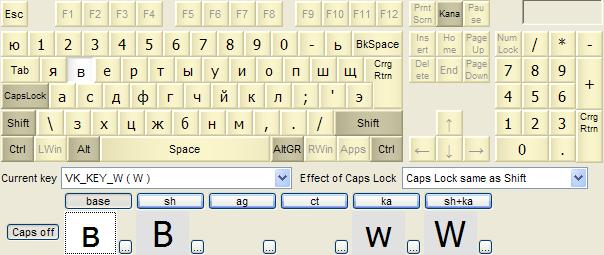
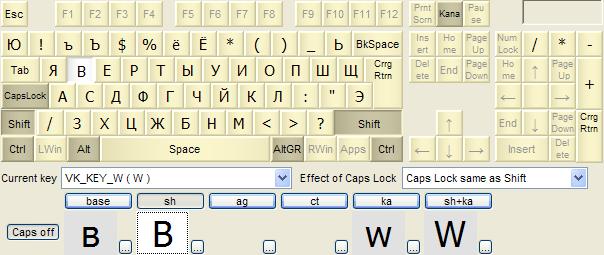
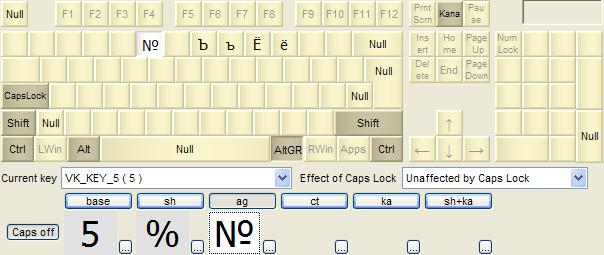
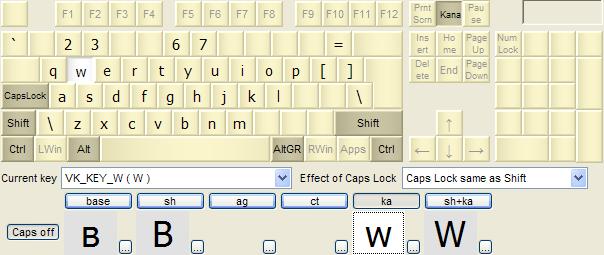
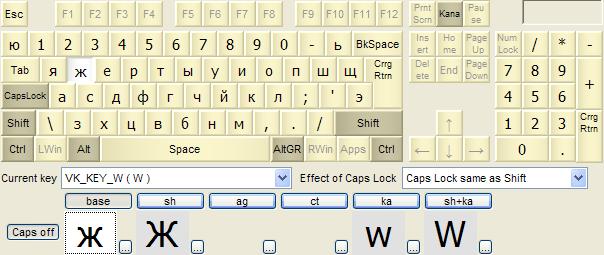
Example - Multi-lingual Russian phonetic / US English keyboardInstaller packages: KbdEditInstallerRussianPhoneticYAndUSEnglish.exe , KbdEditInstallerRussianPhoneticZHAndUSEnglish.exeLayout files: Russian phonetic Y.zip, Russian phonetic ZH.zipYou can use the installer packages to deploy these keyboard layouts without any restrictions. Free Demo version can be used to make changes and test them. To deploy a modified version, a Premium, Personal or Lite edition is needed. Even though Windows supports the standard Russian keyboard in both its variants (Russian - layout file KBDRU.DLL, KLID 00000419, and Russian typewriter - KBDRU1.DLL, 00010419), many people prefer a non-standard layout known as Russian phonetic. In this layout, Cyrillic letters are placed on positions of their phonetic Latin equivalents. Letters like Я, Ч, Ш, which have no direct Latin counterparts, are mapped to Latin letters without Cyrillic equivalents (Q, W, Y, X) and to less commonly used interpunction signs. This example implements two most popular versions of the Russian phonetic layout: ЯВЕРТЫ (file Russian phonetic Y.zip) and ЯЖЕРТЫ. It even goes one step further, by also providing a full implementation of standard US English - the two are switched between by pressing the KANA key, mapped to rarely used Scroll Lock. The users who frequently switch between Cyrillic and Latin can thus avoid the often cumbersome Language bar by registering only one layout with Windows (see Multi-lingual English / French keyboard for a detailed explanation of this technique). You can use either version of Russian phonetic by simply importing its KBE file - of course, nothing prevents you from further customizing it to better suit your needs (see Examples for general guidelines).
The second file Russian phonetic ZH.zip contains an alternative ЯЖЕРТЫ Russian phonetic layout. It is very similar to the already described ЯВЕРТЫ, and differs only in the placement of few Cyrillic letters. This layout also supports switching between Cyrillic / Latin using togglable KANA.
|
|
Copyright © KbdSoft 2007-2026 |