 |
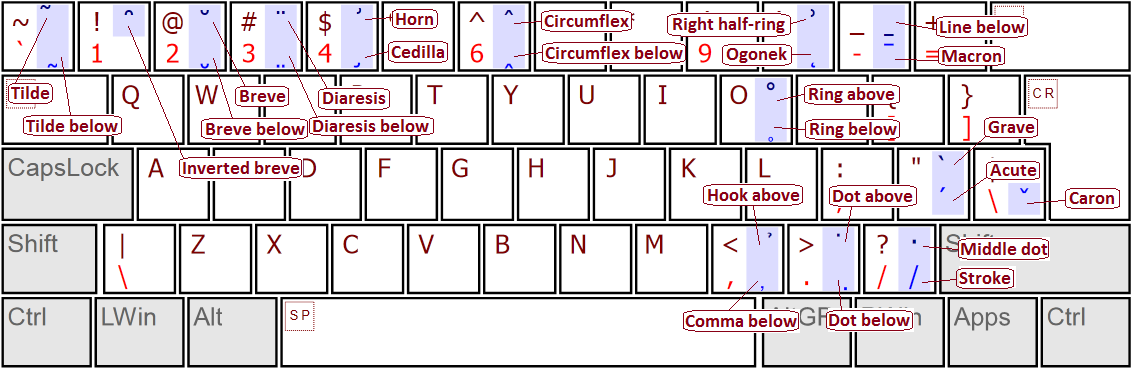
Example - US English keyboard with all Latin accents using chained dead keysInstaller package: KbdEditInstallerUSChainedDeadKeyMultiAccent.exeLayout file: US Chained Dead Key Multi Accent.zipDead key table file: Chained Dead Table All Accents.zipYou can use the installer package to deploy this keyboard layout without any restrictions. Free Demo version can be used to make changes and test them. To deploy a modified version, a Premium, Personal or Lite edition is needed. The Unicode standard defines many accented versions of Latin letters. Most standard Windows layouts support at least some accents through dead keys, depending on the needs of particular language. The standard also defines many double accents consisting of two simple accents simultaneously applied to a letter. These accents are heavily used in Vietnamese alphabet, where five tone marks (grave ̀ , hook ̉ , tilde ̃ , acute ́ and dot below ̣ ) can be combined with already accented letters to produce final letters like ậ or ữ (and several other combinations). Double accents can also appear in Pinyin Chinese Romanization ( ǖ ǘ ǚ ǜ ). Double accents are generally not available in standard Windows keyboards. An earlier KbdEdit example - French multilingual keyboard - does a decent job of mapping a rich subset of double accents to custom dead keys. However, it suffers from a typical limitation of "classic" dead keys - each double accent is mapped to a distinct VK/modifier position. This limits the number of accessible double accents and forces them to be mapped to counter-intuitive key combinations that are difficult to memorize. This example goes one step further by supporting all "conventional" single accents, plus all double-accent combinations, through a convenient subset of easy-to-memorize dead keys. Chained dead keys are used to produce double accents using two-key sequences of their single-accent components (see further below for a complete table of double accents). This way, a total of 62 accents (26 single + 36 double) is produced using only 26 dead keys. The image below shows the positions of accents that have direct high-level dead key mappings. They are mapped to AltGr and Shift+AltGr positions, leaving the original US English Base and Shift positions intact. Where the same accent exists in both "above" and "below" version (like 'Diaeresis' ̈ and 'Diaeresis Below' ̤ ), an effort has been made to map the "below" accent to AltGr and the "above" counterpart to AltGr+Shift position of the same key.
If you normally use the standard US English layout, you can use the attached layout file US Chained Dead Key Multi Accent.zip without modifications (the examples page explains how). If you are not happy with the placement of accent dead keys, you can use the high-level editor to rearrange them to your taste. If you use a different layout, you will first have to use the Import dead char table from KLD file command in the Dead char editor to import the attached dead table file Chained Dead Table All Accents.zip. You should then use the high-level editor to map the accents you are interested in to VK/modifier positions of your choice. Unless you specifically want to have double accents available through a single keystroke, you should create dead-key mappings only for the single accents - the double accents are available by default through chaining and don't require any additional effort. First-level dead keys - single accentsThe example supports 26 "single" accents, each of which is mapped to its own VK key / modifier position in the high-level editor. Each dead character is represented by the Unicode character for the accent it represents. E.g. dead character for accent 'Breve' is Unicode character 0306 ̆ 'Combining Breve'. This table shows all single accents, along with the keystrokes to produce them:
Second-level dead keys - double accentsFurther 36 dead characters represent double accents produced by chaining two simple accents together. Since Unicode generally does not define convenient single characters for complex accents, and the corresponding dead characters are not meant to be directly mapped to VK code / modifier positions anyway, numeric values for the chained dead characters are chosen arbitrarily from the "Private use" area (E000 - E036). In most cases, chaining sequences are symmetrical: e.g. double accent 'Breve And Acute' can be produced by either 'Breve' followed by 'Acute' or 'Acute' followed by 'Breve'. The only exception is the Macron / Diaeresis pair - interestingly, "Diaeresis And Macron" and "Macron And Diaeresis" are two distinct accents, hence 'Macron' followed by 'Diaeresis' produces different result from 'Diaeresis' followed by 'Macron'. Also note that 'Double Acute', even though technically not a double accent, is produced by pressing 'Acute' twice rather than being given its own first-level dead character. Likewise, 'Double Grave' is produced by pressing 'Grave' twice. This way, two VK code / modifier positions are saved in the high-level editor. Of course, if you prefer these accents to be produced by a single keystroke, you can easily assign them to key/modifier positions of their own. This table shows all double accents supported by the example, along with the chaining sequences to produce them:
| ||||||||||||||||||||||||||||||||||||||||||||||||||||||||||||||||||||||||||||||||||||||||||||||||||||||||||||||||||||||||||||||||||||||||||||||||||||||||||||||||||||||||||||||||||||||||||||||||||||||||||||||||||||||||||||||||||||||||||||||||||||||||||||||||||||||||||||||||||||||||||||||||||||||||||||||||||||||||||||||||||||||||||||||||||||||||||||||||||||||||||||||||||||||||||||||||||||||||||||||||||||||||||||||||||||||||||||||||||||||||||||||||||||||||||||||||||||||||||||||||||||||||||||||||||||||||||||||||||||||||
|
Copyright © KbdSoft 2007-2026 |